Ecommerce Analytics Report: Understanding Buyers, Revenue & Channels
Running an online store without looking at the data is a lot like driving blindfolded. You might be moving fast, but you have no idea if you're actually heading in the right direction.
This guide is designed to help online store owners decode their data. It will show you exactly how to understand who buys from you, what they are buying, which marketing channels actually drive revenue, and how different customer segments behave. Let’s dive into the essential metrics you should be tracking in Google Analytics 4 (GA4).
![Total Revenue [GA4]](/blog-assets/2026-04-1-1.jpg) This shows the complete revenue generated from ecommerce transactions during the reporting period. This is the primary, foundational metric for any online business.
This shows the complete revenue generated from ecommerce transactions during the reporting period. This is the primary, foundational metric for any online business.
![Average Purchase Revenue [GA4]](/blog-assets/2026-04-2-1.jpg) This tracks the average value of each transaction. Checking this helps you distinguish between high-volume/low-value sales and low-volume/high-value sales, which is crucial for adjusting your pricing strategies.
This tracks the average value of each transaction. Checking this helps you distinguish between high-volume/low-value sales and low-volume/high-value sales, which is crucial for adjusting your pricing strategies.
![E-commerce Purchases by Item Name [GA4]](/blog-assets/2026-04-3-1.jpg) Highlights your individual product sales volume. Simply put, this shows you exactly which items are flying off the digital shelves.
Highlights your individual product sales volume. Simply put, this shows you exactly which items are flying off the digital shelves.
![Top Selling Products (All Traffic) [GA4]](/blog-assets/2026-04-4-1.jpg) Provides a ranked list of your best-selling items across all channels. This is your foundational ecommerce intelligence.
Provides a ranked list of your best-selling items across all channels. This is your foundational ecommerce intelligence.
![Top Selling Products (Organic Traffic) [GA4]](/blog-assets/2026-04-5-1.jpg) Highlights your best-selling items specifically from organic search. This reveals exactly which products resonate the most with search-driven audiences.
Highlights your best-selling items specifically from organic search. This reveals exactly which products resonate the most with search-driven audiences.
![Views by Page Title and Screen Class [GA4]](/blog-assets/2026-04-6-1.jpg) Tracks your product page view counts. This indicates which products attract the most browsing interest, even if users don't buy right away.
Tracks your product page view counts. This indicates which products attract the most browsing interest, even if users don't buy right away.
![Total Users by Page Title and Screen Class [GA4]](/blog-assets/2026-04-7-1.jpg) Shows the unique visitors to each product page. This helps distinguish between one person viewing an item ten times and ten different people viewing it once, giving you a clearer picture of unique interest.
Shows the unique visitors to each product page. This helps distinguish between one person viewing an item ten times and ten different people viewing it once, giving you a clearer picture of unique interest.
![Transactions per Channel (All Traffic) [GA4]](/blog-assets/2026-04-8-1.jpg) This shows the volume of purchases from each channel. This complements your revenue data to show exactly how efficient each channel is at driving volume.
This shows the volume of purchases from each channel. This complements your revenue data to show exactly how efficient each channel is at driving volume.
![Top Selling Sources (Organic Traffic) [GA4]](/blog-assets/2026-04-9-1.jpg) Tracks revenue from specific organic sources. This is useful for understanding which search engines (like Google versus Bing) drive the most value for your store.
Tracks revenue from specific organic sources. This is useful for understanding which search engines (like Google versus Bing) drive the most value for your store.
![Sessions by Session Default Channel Grouping [GA4]](/blog-assets/2026-04-10-1.jpg) Offers standardized channel categorization, making it much easier to maintain consistent reporting month over month.
Offers standardized channel categorization, making it much easier to maintain consistent reporting month over month.
![Revenue per Gender (Organic Traffic) [GA4]](/blog-assets/2026-04-11-1.jpg) Shows organic-specific revenue by gender, which is highly useful for tailoring your organic content and SEO strategy.
Shows organic-specific revenue by gender, which is highly useful for tailoring your organic content and SEO strategy.
![Revenue per Age Group (All Traffic) [GA4]](/blog-assets/2026-04-12-1.jpg) Tracks revenue by age brackets (18-24, 25-34, 35-44, etc.). This is critical information for dialing in your age-targeted marketing campaigns.
Tracks revenue by age brackets (18-24, 25-34, 35-44, etc.). This is critical information for dialing in your age-targeted marketing campaigns.
![Users by Gender [GA4]](/blog-assets/2026-04-13-1.jpg) The gender distribution of all site users.
The gender distribution of all site users.
![Sessions by Age [GA4]](/blog-assets/2026-04-14-1.jpg) Session volume by age group.
Session volume by age group.
![Revenue per Country (Organic Traffic) [GA4]](/blog-assets/2026-04-15-1.jpg) Tracks organic revenue by country. This shows you exactly where your organic search presence is geographically the most valuable.
Tracks organic revenue by country. This shows you exactly where your organic search presence is geographically the most valuable.
![Revenue per City (Organic Traffic) [GA4]](/blog-assets/2026-04-16-1.jpg) Highlights organic revenue by city, while Users by Country [GA4] and Users by City [GA4] provide the broader audience distribution context.
Highlights organic revenue by city, while Users by Country [GA4] and Users by City [GA4] provide the broader audience distribution context.
![Users by City [GA4]](/blog-assets/2026-04-17-1.jpg) User distribution by city.
User distribution by city.
![Users by Platform / Device Category [GA4]](/blog-assets/2026-04-18.jpg) Device breakdown (mobile, desktop, tablet) for all users.
Device breakdown (mobile, desktop, tablet) for all users.
![Users by Device Category [GA4]](/blog-assets/2026-04-19.jpg) An alternative device categorization view.
An alternative device categorization view.
![Sessions by Device Category [GA4]](/blog-assets/2026-04-20.jpg) Session volume by device.
Session volume by device.
![User Stickiness [GA4]](/blog-assets/2026-04-21.jpg) Measures how often users return to your site. Higher stickiness indicates stronger brand loyalty and a much better overall customer experience.
Measures how often users return to your site. Higher stickiness indicates stronger brand loyalty and a much better overall customer experience.
![User Activity Over Time [GA4]](/blog-assets/2026-04-22.jpg) Provides a trend visualization of user engagement. This beautifully reveals your traffic patterns and seasonal shopping trends.
Provides a trend visualization of user engagement. This beautifully reveals your traffic patterns and seasonal shopping trends.
![Total Users by Event Name [GA4]](/blog-assets/2026-04-23.jpg) Tracks the unique users performing each of these ecommerce events. This helps you calculate highly accurate funnel conversion rates.
Tracks the unique users performing each of these ecommerce events. This helps you calculate highly accurate funnel conversion rates.
1. Revenue Overview (The Bottom Line)
Every great e-commerce report starts right here. These metrics establish the financial heartbeat of your online store. Before you look at anything else, you need to know how much money is actually coming in.Total Revenue [GA4]
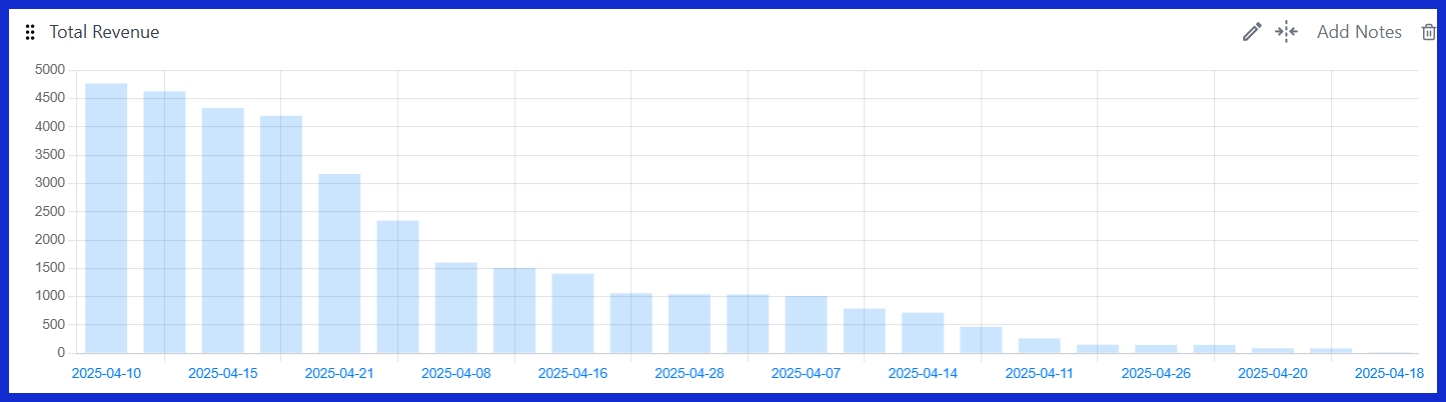
This shows the complete revenue generated from ecommerce transactions during the reporting period. This is the primary, foundational metric for any online business.
Average Purchase Revenue [GA4]
This tracks the average value of each transaction. Checking this helps you distinguish between high-volume/low-value sales and low-volume/high-value sales, which is crucial for adjusting your pricing strategies.
Transactions: All Traffic vs Organic Traffic [GA4]
This compares your total purchase volume against organic-driven (search engine) purchases. This clearly shows the relative contribution of organic search to your overall sales numbers.Revenue: All Traffic vs Organic Traffic [GA4]
This gives you a monetary comparison between all of your marketing channels and your organic traffic. This specific breakdown is essential for calculating your long-term SEO ROI.E-commerce Purchases by Item Name [GA4]
Highlights your individual product sales volume. Simply put, this shows you exactly which items are flying off the digital shelves.
E-commerce Purchases by Order Coupon [GA4]
Tracks which coupon codes successfully generated purchases. This is incredibly useful for promotion analysis, so you know if your latest discount code is actually working.2. Product Performance
Understanding which products drive your business helps inform your inventory planning, marketing campaigns, and content decisions.Top Selling Products (All Traffic) [GA4]
Provides a ranked list of your best-selling items across all channels. This is your foundational ecommerce intelligence.
Top Selling Products (Organic Traffic) [GA4]
Highlights your best-selling items specifically from organic search. This reveals exactly which products resonate the most with search-driven audiences.
Views by Page Title and Screen Class [GA4]
Tracks your product page view counts. This indicates which products attract the most browsing interest, even if users don't buy right away.
Total Users by Page Title and Screen Class [GA4]
Shows the unique visitors to each product page. This helps distinguish between one person viewing an item ten times and ten different people viewing it once, giving you a clearer picture of unique interest.
3. Channel & Source Performance
Not all traffic is created equal. A thousand visitors from one source might buy nothing, while ten visitors from another might clear out your stock. This section identifies which marketing channels deliver actual revenue.Revenue per Channel [GA4]
Gives you a monetary breakdown by channel (organic search, paid search, social, email, direct, etc.). This is the absolute foundation of your channel ROI analysis.Transactions per Channel (All Traffic) [GA4]
This shows the volume of purchases from each channel. This complements your revenue data to show exactly how efficient each channel is at driving volume.
Top Selling Sources (All Traffic) [GA4]
Ranks specific sources (like Google, Facebook, Instagram, etc.) by revenue. This is much more granular than basic channel grouping and shows where your biggest spenders hang out.Top Selling Sources (Organic Traffic) [GA4]
Tracks revenue from specific organic sources. This is useful for understanding which search engines (like Google versus Bing) drive the most value for your store.
Session Sources [GA4]
Displays raw traffic sources alongside their session counts. This provides the necessary volume context for all of your revenue data.Sessions by Session Default Channel Grouping [GA4]
Offers standardized channel categorization, making it much easier to maintain consistent reporting month over month.
4. Buyer Demographics
Knowing exactly who buys helps you tailor your marketing, your messaging, and even your future product development.Revenue per Gender (All Traffic) [GA4]
Breaks down revenue by male, female, and unknown genders. This reveals which specific segments drive the most spending on your site.Revenue per Gender (Organic Traffic) [GA4]
Shows organic-specific revenue by gender, which is highly useful for tailoring your organic content and SEO strategy.
Revenue per Age Group (All Traffic) [GA4]
Tracks revenue by age brackets (18-24, 25-34, 35-44, etc.). This is critical information for dialing in your age-targeted marketing campaigns.
Revenue per Age Group (Organic Traffic) [GA4]
Highlights organic revenue by age, which further informs your content creation and keyword targeting.Users by Age [GA4]
The age distribution of all site users. This provides excellent overall demographic context.Users by Gender [GA4]
The gender distribution of all site users.
Sessions by Age [GA4]
Session volume by age group.
Sessions by Gender [GA4]
Session volume by gender.5. Geographic Revenue
Location matters, especially when it comes to shipping logistics, localization efforts, and market expansion decisions.Revenue per Country (All Traffic) [GA4]
Calculates total revenue by country, allowing you to quickly identify your top international markets.Revenue per Country (Organic Traffic) [GA4]
Tracks organic revenue by country. This shows you exactly where your organic search presence is geographically the most valuable.
Revenue per City (All Traffic) [GA4]
Dives into city-level revenue data. This is incredibly useful for local businesses or regional ad targeting.Revenue per City (Organic Traffic) [GA4]
Highlights organic revenue by city, while Users by Country [GA4] and Users by City [GA4] provide the broader audience distribution context.
Users by Country [GA4]
User distribution by country, providing broad audience context.Users by City [GA4]
User distribution by city.
6. Device & Platform
How customers access your store directly impacts their conversion rates. If your mobile experience is clunky, you're leaving money on the table.Users by Platform / Device Category [GA4]
Device breakdown (mobile, desktop, tablet) for all users.
Users by Device Category [GA4]
An alternative device categorization view.
Users by Device Model [GA4]
Specific device models (iPhone 15, Samsung Galaxy, etc.). This is highly useful for technical optimization and bug hunting.Sessions by Device Category [GA4]
Session volume by device.
Revenue per Channel [GA4]
Cross-referencing this with device data helps you identify channel-device performance patterns (e.g., maybe Facebook ads convert better on mobile, but organic search converts better on desktop).7. Customer Behavior
Beyond simple transactions, understanding how customers interact with your site helps you improve retention and maximize their lifetime value.User Stickiness [GA4]
Measures how often users return to your site. Higher stickiness indicates stronger brand loyalty and a much better overall customer experience.
User Activity Over Time [GA4]
Provides a trend visualization of user engagement. This beautifully reveals your traffic patterns and seasonal shopping trends.
Event Count by Event Name [GA4]
Tracks key ecommerce events like adding to cart, beginning checkout, adding payment info, and purchasing. This is vital for identifying exactly where people drop off in your checkout funnel.Total Users by Event Name [GA4]
Tracks the unique users performing each of these ecommerce events. This helps you calculate highly accurate funnel conversion rates.